


Pilot open · UK teams on Microsoft 365

Know what needs to happen next.

Magpie gathers your team's Outlook, WhatsApp and chat into one calm view of the work that isn't finished — and suggests the next step. You decide.

Mac Windows iPhone
magpie — Today
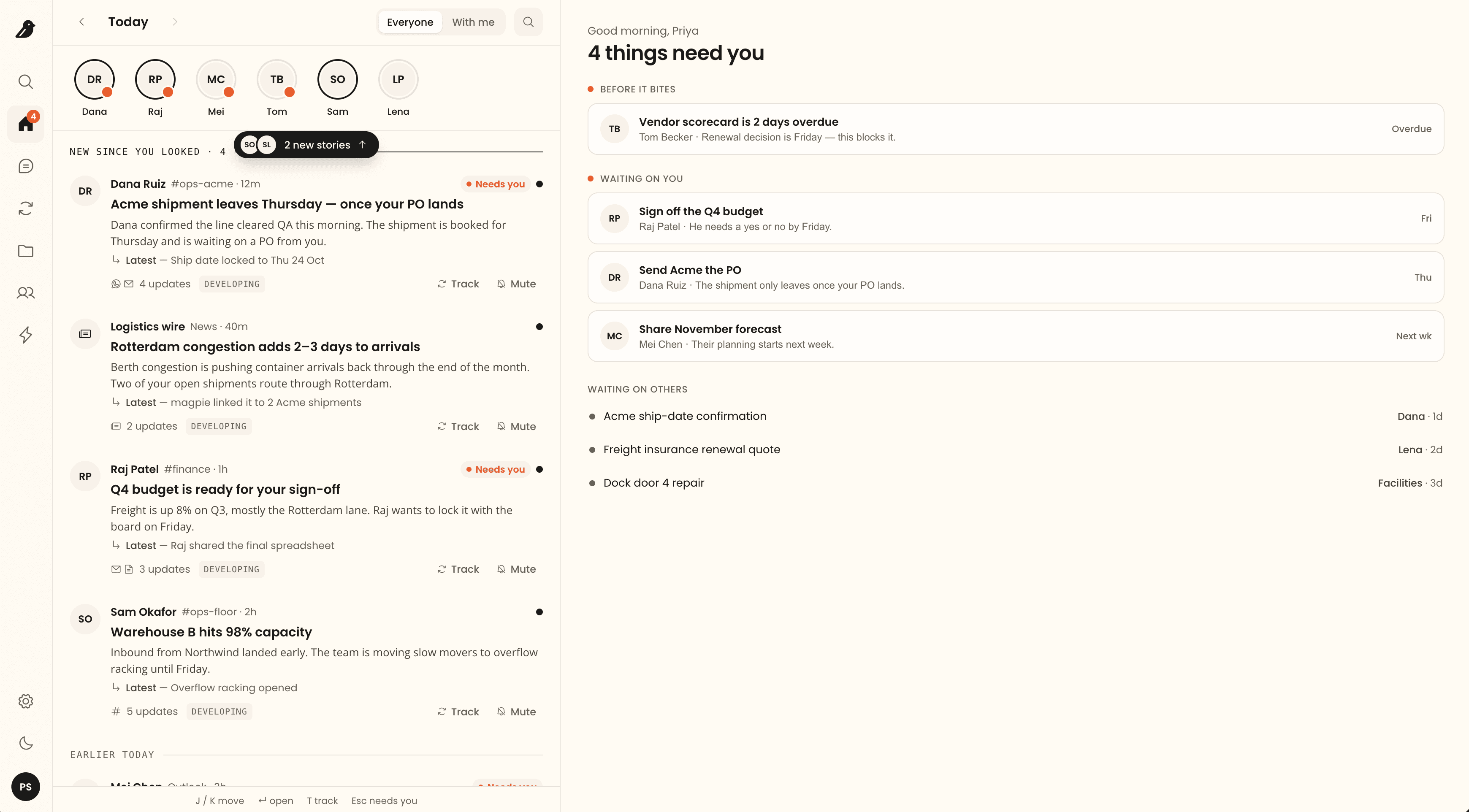
magpie Today view: stories on the left, things that need you on the right
With Microsoft
Microsoft for StartupsMicrosoft AI Cloud PartnerAvailable on Microsoft Marketplace

Scattered messages in. A clear next step out.

Magpies collect scattered things into one place. So does magpie — in three quiet moves.

Truck booked for Thu6:58
PO still needed from PriyaMon
Pallets are 24 now7:12
Acme shipment leaves Thursday — once your PO lands
3 updates
1 · Gather

Messages become one story

A WhatsApp here, an email there. Magpie folds them into one piece of work, so you stop piecing it together yourself.

Developing Settled
Acme shipment leaves Thursday
What changed
Ship date moved to Fri 25 OctShip date locked to Thu 24 Oct
3 updates · WhatsApp 6:584 updates · WhatsApp 6:58
2 · Settle

The newest fact wins

Dates move and plans change. Magpie keeps the history but shows you what's true now — and whether it's still moving.

Send Acme the POTomorrowClosed
Pallet count confirmed
PO number shared
Magpie asked you to check. You closed it.
3 · Close

Done when you say so

"All done" is a claim, not proof. Magpie checks what's left, then asks you. The Loop closes when you confirm.

Before and after

See it in ten seconds

Before

147 unread across three apps, and no idea which ones matter.

With magpie

Three things need you, and the story behind each.

The product

A short tour of a working day

Real screens from the app. Numbers on each screen match the notes above it.

Today

Start the day with what changed

Not 80 unread emails. A short list of stories on the left — and on the right, the four things that need you, sorted by how soon they bite.

1People first. A dot means someone is waiting on you.
2Stories, not threads. Four updates across WhatsApp and Outlook, told once, with the latest fact up front.
3What needs you. Overdue first, then what’s waiting on you, each with the reason.
4What you’re waiting on. Who owes you what, and for how long.
Today view: stories on the left, four things that need you on the right
How it works

Magpie notices. You decide.

Nothing becomes a Loop, gets shared or closes without a person saying so.

Step 1Magpie spots itAn email asks for something or sets a date. Magpie suggests a Loop only you can see.
Step 2 · you decideYou say what it isA task, watch, milestone or goal. Pick an owner, or dismiss it.
Step 3Magpie suggests what's nextEach new message is read against the Loop's history: chase, wait, review or check it's done.
Step 4 · you decideYou close itMagpie asks you to check. The Loop closes when you confirm.
TaskGet Patel Agro's agreement signed
WatchStock delivery from Blue Truck
MilestoneFirst 20 stores ready
GoalNew fertiliser in 40 stores by Mar 1
Security and privacy

Your mail is yours until you share it

Plain answers for you and your IT team. If we haven't done something yet, we say so.

Admins can't read your mailMailboxes, contacts and suggestions are private to each person.
Magpie suggests. People decide.Nothing is shared, sent or closed until a person confirms it.
The AI sees less than you thinkNames, email addresses and IDs never reach the model.
Microsoft sign-in, UK-hostedEncrypted, on Azure in the UK. Every attachment is scanned for malware first.
ICO registered, UKIn placeISO 27001Planned, H2 2027Ask for our security notes

Listed on Microsoft Marketplace — we onboard pilot teams personally.

Industries

For UK teams that run on outside messages

Questions people ask

One piece of team work with an owner, a status and the conversation that moves it. A Loop can be a task, a watch on something you're waiting for, a milestone or a goal.

Join the pilot

Free while we build it with you. We ask for a month on one real goal, and a note whenever something gets in your way.

Best for teams of 5 to 50 on Microsoft 365.

Nikhil will email you within two working days. Requires Outlook.

Nikhil Mishra
Who you'll be talking to
Nikhil MishraFounder · every pilot team works with him directly
LinkedIn